
HITACHI - PLASMA TV DW3s - TROUBLESHOOTING
FAULT: NO PICTURE
Reasons
- The power supply may not be producing the correct voltages.
- The Digital Module may not be producing correct Turn-On command s [Power-1 & Power-2]
- The Logic PWB may not be supplying the correct Vs/Va Turn-On commands.
- The Panel shorted.
- The panel is defective, but not presenting short.
- Y-SUS and or X-SUS may be defective. [Shorted or non-working]
Monitor the front panel Power LED.
- Does it turn ON, and then go OFF completely (Indicates shut-down). Power supply is not running. (Might be due to a short circuit).
- Does it Turn On and stay Green, but No picture. No shut-down.
- power supply running basic power supplies, but Vs/Va voltages are not present.
Observations [Power supply]
- Look carefully around all mounting screws for cracks or PWB damage.
- BUFFERS (Drivers) on SDR Upper and/or lower PWBs [50" to 60"]
Carefully observe the Buffer "Snot" Chips. Left side black chips
mounted on the SDR upper and lower PWBs. Check very closely for burns
and/or small holes in these chips. If any defect is noted, make sure
that the PWB is defective. Replace it and the Y-SUS if PWB is not
upgraded. Replace only SDR if PWB id upgraded.
COF [Chip On Film] from panel to A-Bus [42"]
Carefully observe the COFs (mounted on the flexible ribbon cables).
Look very closely for burns and/or small holes in these chips.
Check whether any ribbon cable damage on the connections to the
Panel itself from the A-BUS PWBs. If any defect noted, the panel is
defective. Some additional dis-assembly is required to see thes COFs as
they are on the under side of the ribbon cable coming from the panel to
A-BUS L, R and C PWBs.
Hitachi Plasma TV Power Supply troubleshooting
PWB CHECK

- Look for any burns, open fuses etc:
- If burns found, replace the PCB as card basis. It in not practical to make a repair to this board.
VOLTAGE CHECK
- When AC is first applied, the power supply should turn ON and supply the following voltages.
- Standby voltages [SBY 5V], SBY 3.3V on some models] and all voltages on the CNPSS connector.
- This requires Power-1 and Power-2 commands being high coming from the Dig-Main PWB CN-63. After approx: two minutes, unless quick start is ON, a relay click is heard and the CNPPS voltages turn OFF.
- If quick start is ON, power 1 & 2 commands remain high and all above voltages remain ON.
WHEN THE POWER BUTTON IS PRESSED:
When the power button is pressed, the logic PWB sends Vsago and Vcego commands to the power supply; via CN64 connector.
- There are two conditions the set can be in before the power button is pressed.
- If quick start is OFF, the Power-1 and Power-2 commands are output from the Digi-Main PWB after a short internal self diagnosis is run.
- If quick start is ON, the above stated does not happen because, Power-1 & 2 commands are already high, 'When AC is first applied'.
- Generating the Vs and Va voltages? This requires the Vcego & Vsago commands being high coming from the logic PWB CN-68 connector.
For a 42"
- Va-CN64 pin number-1
- Vs- [85v] CN64 pin number-7
- -Vs-[-85.8v] CN 64 pin number 9 (For newer DW-3 chassis)
For a 50"
- Va-[60V] CN64 pin number-1
- Vs-[80V] CN64 pins 8/9/10
COMMON CONDITIONS 2&3 BELOW IN THE DW-3 SERIES
- Any time Vs of Va voltages do not appear and a test is made, each time a new test to be made.
- Press the Power button and turn the Plasma Off.
- Wait until a click of relay is heard.
- Unplug CN64 connector.
- Re-plug the CN64 connector.
- If this is not done, the turn ON command for Vs/Va at pins 7&8 of the CN68 connector will not happen.
- If the connector CN68 is pulled and voltage readings are taken on the CN68 connector at power supply the STB 3.3V will be present at pin-3. There will be no voltage at pin-1.
P50H401 POWER SUPPLY REGULATOR BOARD
Hitachi Plasma TV Troubleshooting

FAULTS
- The green power LED is always ON.
- The power LED will go green and may go Off or stay ON.
- Green power LED will go green then go Off or may not go green at all.
THE GREEN POWER LED IS ALWAYS ON
- This indicates that the set is providing Vs and Va voltage to the X-SUSTAIN & Y-SUSTAIN PWBs. Use an analogue scope. Look at the outputs from X-SUS and X-BUS. Use the top pin of the connector going to panel, on either side.
- No activity usually indcate with a defective PWB.
- Pull the ribbon cable from that PWB to the panel, and check again.
- If there is activity now, the panel might be defective. In most cases, it is.
- Pull all ribbon connectors before condemning the PWB.
- If the panel is defective, in most cases it can be seen by the panel itself.
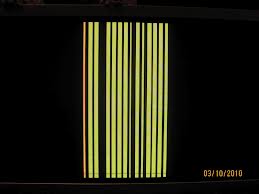
- If Top ribbon cable is pulled, the top of the screen will be black; but the bottom will have raster.
GREEN POWER LED GO GREEN THEN GO OFF.
- This indicates a load on the line.
- Pull CN64 connector feeding Vs and Va voltages to X-Sustain.
- Measure the resistance in [Ohms] from Va and Vs lines on each PWB.
- Low resistance value indicates a defective PWB. Normal reading should be of Mega-ohms. Using the diode mode on the DV/Voltmeter, there should be a brief charge time, then infinity. Note, if there is a charge on the line, the meter may show low. Pull the CN-68 connector and take the reading again.
- The line should now be infinity when reading the power supply pins for Va and Vs when reading the connector going to the X-SUSTAIN PWB.
- If a low is see on the connector , pull CN32 [bottom right hand plug on the Y-SUS board.
After the connector is pulled:
If low disappears, then the Y-SUS or SDR PWB has the fault. If low remains, X-SUSTAIN is faulty
Pull all ribbon cables going to the panel, one by one while reading
Vs/Va pins. If the low disappears, the panel is defective.
Before confirm, check SDR buffer too.
If low remains the Y-SUSTAIN and/or SDR PWBs are defective.

- If no evidence found:
- Does Vs & Va voltages stay up.
- If yes, Panel is defective.
- If No, in this case neither PWB can be confirmed as fault. Suspect Y-SUSTAIN PWB.
- Disconnect the SDR Upper or Lower or Both from the Y-SUSTAIN PWB, and test Vs/Va voltages. They must come On and stay up with these PWBs removed from the Y-SUSTAIN PWB.
IF THERE IS NO Vs/Va
- There must be a dead load on the line, or no Vsago/Vcego commands from teh Logic PWB CN68.
- Check the Va and Vs run-on commands.
- The SBY 5V from CN63 pin-1, must be present before Vsago/Vcego lines can function. AS the Power button is pressed, [Vcc5.1V] should come when Vcego/Vsago. Commands go high.
TESTING THE Vs & Va TURN ON COMMANDS
- Press the Master Power Switch on the bottom, to remove AC.
- Wait unitl a relay click is heard.
- Unplug CN68 connector, and re-plug it back. If this is not done, Turn On command Vcego / Vasgo at pins 7&8 of CN 68 will not happen.
- Connect a DC voltmeter to the CN68 connector Vcego / Vsago.
- Press the vacation switch to apply AC power, and wait for about 30 seconds for initilization.
- If Normal: After several seconds, Vcego / Vsago voltages should reach to 3.3v.
- If a troubele is sensed, these pins will climb and then quickly drop the voltage to less than 0.03.
AFTER A TROUBLE SENSE
- Pull the CN64 connector.
- If the condition changes as described above, there is a load on Va/Vs lines.
- If the condition does not change, the the problem is with Logic PWB. Carefully examine the connector from CN68 to the Logic PWB CN6
- Look for any visible damage to this cable.
- Confirm SBY +5V from pin-1 of CN63. There are no diagnostic LED on the Digi-Main PWB.
SOME POINTS TO NOTE WITH DW-3 POWER SUPPLY
- Generates standby 5V any time AC is applied to the power supply PWB. No matter whether the set is turned On or Off.
- Digi-main PWB generates Power-1 and Power-2 commands on the CN63 connector when the set is in quick start, even when the set is Off and when the set is turned On.
- Generates all voltages of CNPPS connector, when the set is in quick start, because of Power-1 and Power-2 are high. # The TV turns on quickly. ## No data communication have to be re-initiated at turn on. ### The Sub-Digital PWB digital tuner can be on.
- Power-1 and Power-2 CN63 connector do not turn on Vs & Va or Vcc 5.1V, it only turns on the CNPPS voltages.
- Power-1 and power-2 CN68 connector comes from the Digi-Main PWB PPM1 connector.
- Vsago&Vsego CN 68 connector comes from the Logic PWB CN6 connector.
- The CN68 connector should be unplugged and then re-inserted to reset the power supply, if Vs of Va did not come up for any reason. If this is not done, Vcego / Vsago will never attempt to turn on Va/Vs again. If AC is removed, this will reset the power supply. It will take over five minutes time.
- Power supply can be forced On to test all power supplies.
- Vcc 5.1V at CN64 pin-3 and CN68 pin-1 is generated at the power supply and is output voltage from the power supply, and not an input.
- In Series-1 models, CNPPS pins7,13,14,15 all are tied together.
- In Series-2 models, CNPSS pins 13,14,15 are tied together.
- Vcc 5.1V, CN63 Pin-3 and CN68 pin-9 are tied together.
- Power-3 is not used [CN63 connector]
- The relays, RL001 & RL002 turn on any time AC is applied to power supply PWB; if quick start is Off, both relays turns off after a two minutes when AC is first applied. If quick start is on, both relays stay on. When the set is turned on, both relays turn on