
SHARP LC26DV20U SERVICE ADJUSTMENTS LCD TV
WHEN REPLACING THE EEPROM IC
If you set a factory initialization, the total hours is reset to zero.
- Turn ON the power and set to TV mode.
- Set the volume to minimum.
- Press both "Volume Down" button on the TV set, and channel number [8] of the remote control for more than 2 seconds.
- After confirmation of each check-sum, Power On Total Hours, Micon Version and Digital TV Micon Firmware, turn Off the power.
===========================================
INIT: C7C3 > Initial setting data check sum
ROM: 0000 > Rom correction data check sum
ADC: 8F97 > AD converter data check sum
DVP 1: F5EB > Scaler data check sum
DVP 2: 29EF > Scaler data check sum
LCD ON: 0000 > Power on total hours (16 notation)
OEC7155B_004 > Micon Version
DTV d01630401 > digital TV micon Firmware.
===========================================
CONFIRMATION OF INITIAL DATA
# If a service repair is
undertaken where it has been required to change the Memory IC, the
following steps should be taken to ensure correct data settings while
making reference to intital setting table.
- Turn ON the power, and set to the TV mode.
- Set the volume to minimum.
- Press both 'Volume Down' button on the TV set, and channel [6] on the remote control for more than 2 seconds. Address data should appear as shown down.
- Address is now selected should 'blink'. Using [Up / Dn] button on the remote, step through the addresses until required address to be changed is reached.
- Press [Right / Left] button to select Data. When Data is selected, it should 'blink'.
- Again, step through Data, using [Up / Dn] button till the required data value has been selected.
- Press [Right / Left] button will take back to the 'addresses' for further selection if necessary.
- Repeat steps [4] to [6] until all data has been checked.
- When satisfied correct Data has been entered, turn power Off [return to stand-by mode] to finish data input. [[After the Data Input, set to the initializing of shipping]]
- Turn Power ON.
- Press both [Volume Down] button on the TV set, and channel button [1] on the remote control for more than 2 seconds.
- After finishing the initialization of shipping, the unit will turn Off automatically. [the unit will now have the correct data for the new memory IC]
-------------------------------------------
INIT 0000 00
LCD ON 0000
OEC7155B_004
DTV d0163041
------------------------------------------
Features of the Sharp LC-26DV20U 26" Flat Panel LCD TV with Built-In DVD Player
LC.26DV20U
LC 26DV20U
LC_26DV20U
LC26DV20U
Specifications for the Sharp LC-26DV20U 26" Flat Panel LCD TV with Built-In DVD Player
- True 16:9 Aspect Ratio (1366 x 768) LCD Panel: displays 16:9 widescreen programs in their native aspect ratio without the need for scaling or other video processing
- Built-in side-loading progressive scan DVD player is the ultimate is convenience!
- Built-in ATSC / QAM / NTSC Tuners for HDTV and analog TV viewing
- High Brightness (450 cd/m2): Sharp Liquid Crystal Televisions are very bright, so you can put them practically anywhere – even near windows, doors or other light sources – and their picture is still vivid.
- HDMI Input for convenient connection to digital devices.
- 170º H x 170º V Viewing Angles are so wide you can view Sharp Liquid Crystal Televisions from virtually anywhere in the room!
- 60,000-Hour Lamp Life
- 800:1 Contrast Ratio provides incredible images whether you're watching dark or bright scenes
- 8ms Response Time ensures you will enjoy all fast motion video without blurring or delay
LC.26DV20U
LC 26DV20U
LC_26DV20U
LC26DV20U
Specifications:
Specifications for the Sharp LC-26DV20U 26" Flat Panel LCD TV with Built-In DVD Player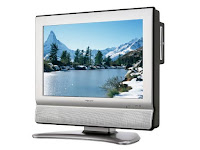
| SPECIFICATIONS | LC-26DV20U |
| Panel Type | 26" Active Matrix (a-si TFT) LCD |
| Pixel Resolution | WXGA (1366 x 768) |
| DVD Player | Progressive Scan |
| Tuning System | ATSC / QAM / NTSC |
| Lamp Life | 60,000 hours |
| Viewing Angles | 170º H / 170º V |
| Audio System | 10 W + 10 W |
| Contrast Ratio | 800:1 |
| Aspect | 16:9 |
| RatioBrightness | 450 cd/m |
| Response Time | 8ms |
| PC Input | No |
| HDMI Input | HDMI x 1 |
| Component Input | Y/Pr/Pb x 1 |
| S-Video Input | 4-pin DIN x 1 |
| Composite Video Input | RCA x 2 |
| Audio Inputs | RCA L/R (x 4) |
| Audio Outputs | RCA L/R x 1, Digital Audio Output x 1 |
| Power Consumption AC | 155 W (Standby 1 W) |
| Power Source | 120V |
| Dimensions(w x h x d) | TV and Stand: 21 25/32" x 17 39/64" x 8 63/64" TV only: 21 25/32" x 15 7/8" x 4 11/32" |
| Weight (lbs) | TV and Stand: 20.3 lbs. TV only: 17.5 lbs. |
| VESA Compliant | Yes |
| Cabinet Color | Silver |