LG 32LC41 - 32LC42 - 32LC43 - 32LC44 - S/W PROGRAM DOWNLOAD METHOD - 1
Download method 1 (PCB Ass’y)

- Connect the download jig to D-sub jack
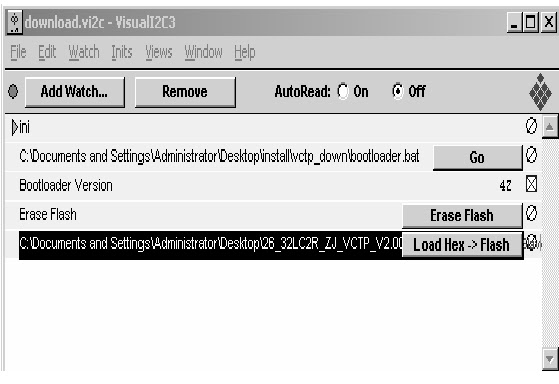
- Execute ‘Download.vi2c’ program in PC, then a main window will be opened.
- Double click the blue box and confirm "Bootloader Version" as 42.

- Click the "Erase Flash" button
- Double click the download file low, then "edit" window will be opened.


- Click the choice button in the “edit window”, then “file choice window” will be opened.
- Choose the Hex file in folder and execute downloading with click " open" button.


- Click OK button at the "edit window".
- Under Downloading process
- If download is failed, for example "No acknowledge from slave". Execute download again from(1).

LG 32LC41 - 32LC42 - 32LC43 - 32LC44 - S/W PROGRAM DOWNLOAD METHOD - 2

- Download method 2 (AV Plate Ass’y)

- Push S/W ‘ON" (connect SCL to GND using switch at Jig) and connect the download jig to D-sub jack.

- Supply the power (Stand-by 5V) and wait for 3 seconds.

- Push the S/W off (Disconnect SCL to GND using switch at jig).
- Execute ‘Download.vi2c’ program in PC, then a main widow will be opened.

- Double click the blue box and confirm "Bootloader Version" as 42.
- Click the "Erase Flash" button.
- Double click the download file low then, "edit" window will be opened.


- Click the choice button I n the "edit window", then "file choice window’ will be opened.

- Choose the Hex file in folder and execute downloading with click "open button".
- Click OK button at the "edit window"
- Under Downloading progress


- If download is failed, for example "No acknowledge from slave", execute download again from (1).

LG 32LC41 - 32LC42 - 32LC43 - 32LC44 - S/W PROGRAM DOWNLOAD METHOD - 3

SOFTWARE DOWNLOAD METHOD
Download method 3 (SET)
- Push the “Tilt” button in an Adjust Remote control Then the LCD TV will change a “slave mode”.

- Connect Zig to TV using a D-sub cable.
- Execute ‘Download_CS.vi2c’ program in PC, then a main widow will be opened.

- Click "GO" button. { If you don’t push the “go”, the Hex file would not be downloaded although the download proceeds normally at first glance.}
- Double click the blue box and confirm "Bootloader Version" as 42.

- Click the "Erase Flash" button.
- Double click the download file low then, "edit" window will be opened.


- Click the choice button I n the "edit window", then "file choice window’ will be opened.

- Choose the Hex file in folder and execute downloading with click "open button"

- Click OK button at the "edit window"
- Downloading.

- If download is failed, for example "No acknowledge from slave", execute download again from (1).
