 LG 42PT350R _ 42PT351R _ 42PT350R-TD_42PT351R-TC _ S/W DOWNLOAD METHOD USING USING USB MEMORY STICK

DOWNLOAD SOFTWARE [USING USB MEMORY STICK]
Caution
- Using ‘power on’ button of the control R/C, power on TV.
- USB file (EPK) version must be bigger than downloaded version of main B/D.
- It should be only one SW binary file in USB Stick.
- Using ‘Power ON’ button of the control R/C, Power on TV.
- Insert the USB memory stick to the SET.
- Display USB loding message then, push the ‘Exit’ Key of control R/C
- Push the ‘MENU’ Key and move the cusor ‘OPTION’ of OSD.
# Caution : Don’t push the ‘OK’ key.Just cusor is on the ‘OPTION’ menu.

- Push the “7” key of control R/C continuously.
- Then, Display “TV Software Update” Pop-up menu.
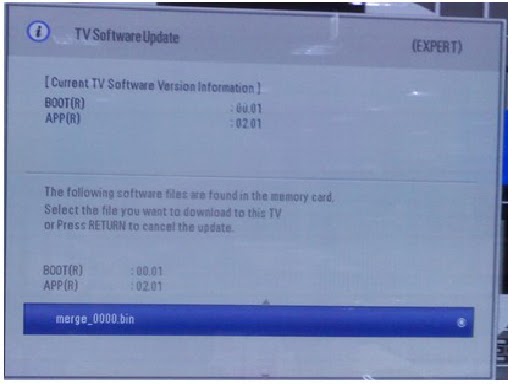
- Select SW file (XXXX.bin) you want, push the “OK” Key.
- S/W download process is executed automatically.
