REPAIRING AND NOT THROWING AWAY

Richtige Fernseher haben Röhren!

Richtige Fernseher haben Röhren!

In Brief: On this site you will find pictures and technical information about Service Modes, Circuit Diagrams, Firmware Update procedure, Disassemble procedure, Universal remote control set-up codes, Troubleshooting and more....

If you go into the profession, you will obtain or have access to a variety of tech tips databases HERE IT IS Master Electronics Repair !.

These are an excellent investment where the saying: 'time-is-money' rules. However, to learn, you need to develop a general troubleshooting approach - a logical, methodical, method of narrowing down the problem. A tech tip database might suggest: 'Replace C536' for a particular symptom. This is good advice for a specific problem on one model. However, what you really want to understand is why C536 was the cause and how to pinpoint the culprit in general even if you don't have a service manual or schematic and your tech tip database doesn't have an entry for your sick TV or VCR.

While schematics are nice, you won't always have them or be able to justify the purchase for a one-of repair. Therefore, in many cases, some reverse engineering will be necessary. The time will be well spent since even if you don't see another instance of the same model in your entire lifetime, you will have learned something in the process that can be applied to other equipment problems.
As always, when you get stuck, checking out a tech-tips database may quickly identify your problem and solution.In that case, you can greatly simplify your troubleshooting or at least confirm a diagnosis before ordering parts.

Happy repairing!
Today, the West is headed for the abyss. For the ultimate fate of our disposable society is for that society itself to be disposed of. And this will happen sooner, rather than later.

How to use the site:

- If you landed here via any Search Engine, you will get what you searched for and you can search more using the search this blog feature provided by Google. You can visit more posts scrolling the left blog archive of all posts of the month/year,
or you can click on the main photo-page to start from the main page. Doing so it starts from the most recent post to the older post simple clicking on the Older Post button on the bottom of each page after reading , post after post.

You can even visit all posts, time to time, when reaching the bottom end of each page and click on the Older Post button.

- If you arrived here at the main page via bookmark you can visit all the site scrolling the left blog archive of all posts of the month/year pointing were you want , or more simple You can even visit all blog posts, from newer to older, clicking at the end of each bottom page on the Older Post button.
So you can see all the blog/site content surfing all pages in it.

- The search this blog feature provided by Google is a real search engine. If you're pointing particular things it will search IT for you; or you can place a brand name in the search query at your choice and visit all results page by page. It's useful since the content of the site is very large.

Note that if you don't find what you searched for, try it after a period of time; the site is a never ending job !

..............The bitterness of poor quality is remembered long after the sweetness of todays funny gadgets low price has faded from memory........ . . . . . .....
Don't forget the past, the end of the world is upon us! Pretty soon it will all turn to dust!

©2010, 2011, 2012, 2013, 2014 Frank Sharp - You do not have permission to copy photos and words from this blog, and any content may be never used it for auctions or commercial purposes, however feel free to post anything you see here with a courtesy link back, btw a link to the original post here , is mandatory.
All posts are presented here for informative, historical and educative purposes as applicable within fair use. NOTHING HERE IS FOR SALE !

Showing posts with label HBUSTER. Show all posts

Tuesday, 2 June 2020

H BUSTER HBD 9250 DVD SCHEMATIC DIAGRAM


HBD 9250DVD H BUSTER -TUNER CIRCUIT DIAGRAM

HBD 9250DVD H BUSTER -  CPU CIRCUIT DIAGRAM

HBD 9250DVD H BUSTER - POWER CIRCUIT DIAGRAM

HBD 9250DVD H BUSTER  - BT CIRCUIT DIAGRAM

HBD 9250DVD H BUSTER - KEY CIRCUIT DIAGRAM

HBD 9250DVD H BUSTER - SD - BT POWER CIRCUIT DIAGRAM

HBD 9250DVD H BUSTER - DVD CIRCUIT DIAGRAM

Saturday, 6 April 2019

H-BUSTER HBD 7300MB - CAR STEREO - CIRCUIT DIAGRAM

H-buster HBD 7300MB - Car Stereo - Circuit Diagram

Schematic- Click on the schematics to zoom in

Friday, 5 April 2019

HBUSTER - HBTV32D03 – HBTV42D03HD (SSC9502S – FMV12N50E - STR-A6059H)SMPS [POWER SUPPLY] - (CIRCUIT DIAGRAM)-[SCHEMATIC] - SERVICE MODE

HBUSTER - HBTV32D03 – HBTV42D03HD (SSC9502S – FMV12N50E - STR-A6059H)SMPS [Power supply] - (Circuit Diagram)-[SCHEMATIC] - SERVICE MODE


POWER SUPPLY [SMPS] SCHEMATIC
CLICK ON THE SCHEMATICS TO ZOOM IN
Please take a printout of these schematic diagrams to view it better
STR A-6059H
PIN CONFIGURATIONS
SERVICE MODE
To enter service menu:  Press [Menu > 8 > 8 > 9 > 3] by remote control buttons.
Follow the on-screen display for adjustments.

HBUSTER HBTV - 32D05HD - POWER SUPPLY [SMPS] SCHEMATIC (CIRCUIT DIAGRAM)

HBUSTER HBTV - 32D05HD - POWER SUPPLY [SMPS] SCHEMATIC (Circuit Diagram)


POWER SUPPLY
CLICK ON THE SCHEMATICS TO ZOOM IN

H-BUSTER - HBTV-32L01HD – HBTV-42L01FD - SERVICE MODE - SMPS (POWER SUPPLY) SCHEMATIC [CIRCUIT DIAGRAM]

H-BUSTER - HBTV-32L01HD – HBTV-42L01FD - SERVICE MODE - SMPS (Power Supply) Schematic [CIRCUIT DIAGRAM]


SMPS SCHEMATICS [HBTV-42]
HBTV-32
Click on the pictures to Zoom In
SERVICE MODE
How to access the service menu with a user remote control: 
Enter : MENU-8-8-9-3  by remote control. [Key presses should be as fast as  possible.]
TV  information will be as shown below.
In the last line of the menu of services, dispay board version and model of panel LCD, 
For example: "L_MST6M36JS_AU32VP_BX"
How to exit service menu:
Simply press the EXIT button on the remote user or disconnect the equipment.
Measurements and Adjustments:
NOT TO BE PERFORMED HÁAJUSTES THIS MODEL. IT IS RECOMMENDED NO CHANGE NO DEFAULT
When performing a software upgrade, swap memory EEPROM of the device show unstable do the procedure below.
Press the UP / DOWN buttons and select
"Init EEPROM", then press the ">". Demoraráalguns the 2nd button to execution.
NOTE: After the "reset", and religueo disconnect device.

Wednesday, 3 April 2019

HBUSTER HBD-7310 - CAR STEREO - SCHEMATIC (CIRCUIT DIAGRAM)

HBUSTER HBD-7310 - CAR STEREO - SCHEMATIC (Circuit Diagram)

SCHEMATIC DIAGRAM [CLICK ON THE SCHEMATICS TO ZOOM IN]

Friday, 29 March 2019

H BUSTER 42 INCH LCD TV – HBTV 42D05FD – SMPS AND BACK-LIGHT INVERTER SCHEMATIC

H BUSTER 42 inch LCD TV – HBTV 42D05FD – SMPS and BACK-LIGHT INVERTER SCHEMATIC

H BUSTER HBTV 42D05 – LCD TV – Power Supply & Back-light Inverter Circuit Diagram
BACK-LIGHT INVERTER
MAIN POWER [SMPS] SCHEMATIC
CLICK ON THE SCHEMATICS TO ZOOM IN

Wednesday, 20 March 2019

H-BUSTER - HBTV 3204HD - LCD TV - POWER - SCHEMATIC [CIRCUIT DIAGRAM]

H-BUSTER - HBTV 3204HD - LCD TV - POWER - SCHEMATIC [CIRCUIT DIAGRAM]


 POWER-1
POWER - 2
POWER - INPUT
Click on images to Enlarge

Tuesday, 19 March 2019

HBUSTER HBTV-32L01HD - HBTV-42L01FD - MAIN POWER - 12V POWER & 1.3V POWER - SCHEMATIC DIAGRAM

HBUSTER HBTV-32L01HD - HBTV-42L01FD - MAIN POWER - 12V POWER & 1.3V POWER - SCHEMATIC DIAGRAM [Click on Schematics to Zoom]


MAIN POWER REGULATOR [TYPE-1]
MAIN POWER REGULATOR [TYPE-2]
12V & 1.3V POWER 

HOW TO DISASSEMBLE [OPEN] - HBUSTER HBTV-32L01HD

HOW TO DISASSEMBLE [OPEN] - HBUSTER HBTV-32L01HD {Click on Pictures to Zoom In}


REMOVE THE BOTTOM & BACK COVER
MAIN BOARD REMOVAL
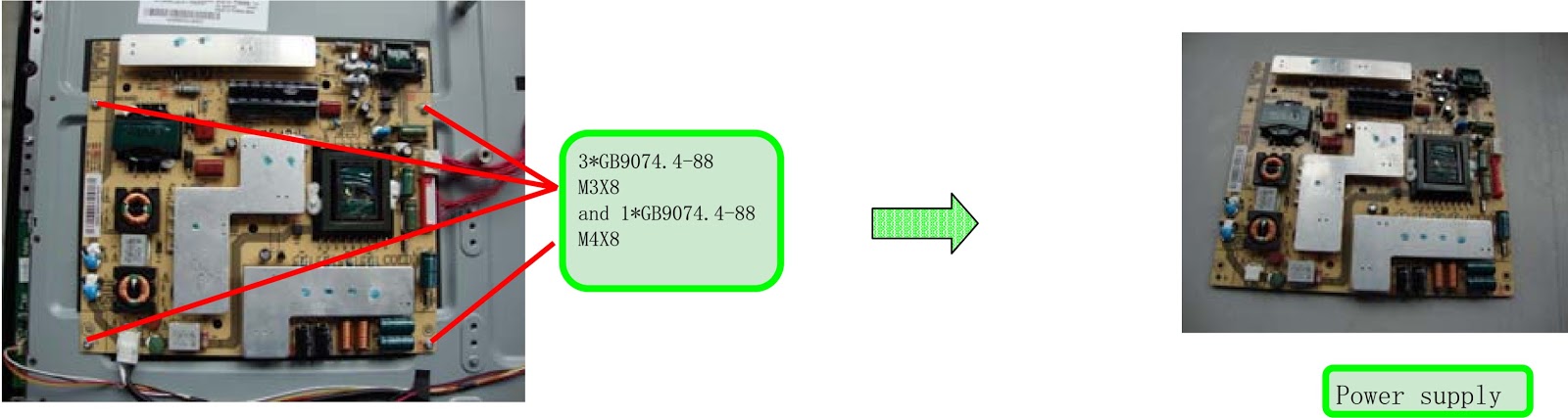
POWER SUPPLY REMOVAL
REMOVAL OF REMOTE CONTROL BOARD
REMOVE THE SIDE METAL SLICE - REMOVE THE BRACKET OF THE MAIN BOARD

HOW TO OPEN - HBUSTER HBTV 42L01FD - [DISASSEMBLE PROCEDURE]

HOW TO OPEN - HBUSTER HBTV 42L01FD - [DISASSEMBLE PROCEDURE] {Click on Pictures to Zoom In}


DISASSEMBLY PROCEDURE
MAIN BOARD BRACKET REMOVAL
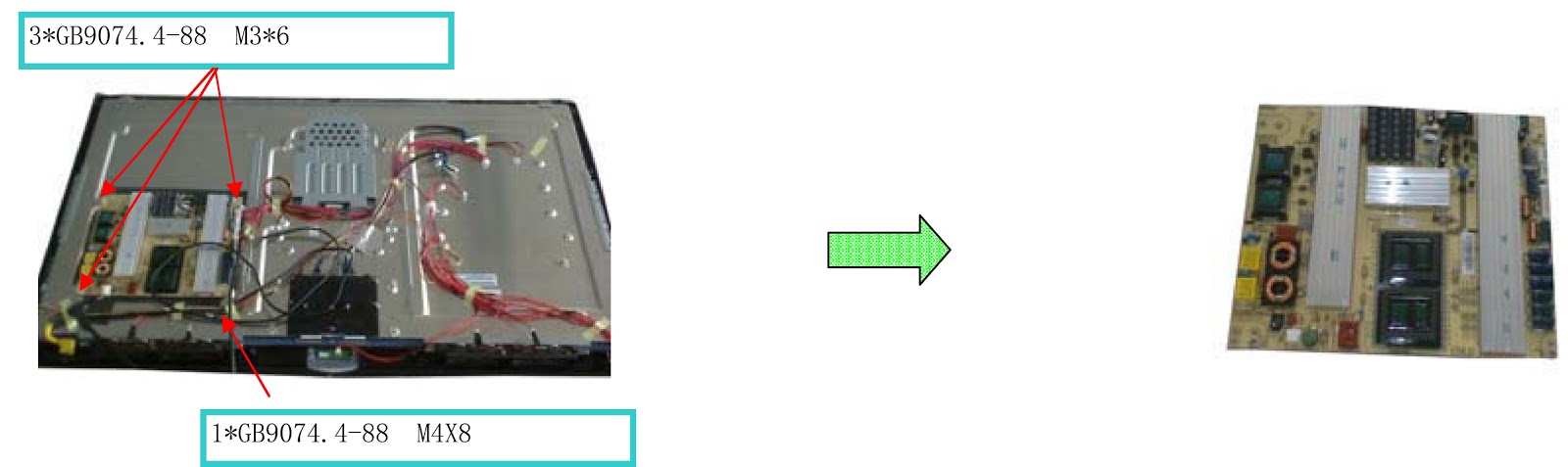
POWER ASSEMBLY REMOVAL
SPEAKER REMOVAL
PANEL BRACKET REMOVAL